


Is Windows XP Better than Windows 7? A User’s Perspective
 MS Windows – is there a more controversial operating system? Everybody seems to “hate” it, but yet, one way or the other, it seems we can’t live without it. Vista was a disaster (guess why I know), but is Windows 7 really that good as its heavy marketing tries to make us believe?
In this guest post, Bob Newman shares his experience with Windows 7 compared to Windows XP. Enjoy.
Bob’s View On Windows XP Better than Windows 7
I have been using Windows 7 for more than one year since it was in Beta stage. It works well but I feel it is yet lack of something so I keep dual system of Windows XP and Windows 7 and often switch them to use. In fact, Windows XP is not bad and even better than Windows 7 in a way. At least my mother likes it very much because it’s simple and practical. The followings are some of my views on Windows XP better than Windows 7. Will you agree with me?
My Mother Prefers IE6

Unrealistic caricature
IE8 is almost the representative of Windows 7 and IE6 can not run on Windows 7. Although the international has loudly appealed for giving up IE6 since IE6 has numerous faults and bugs, there are still many fans for IE6, which indicates IE6 is still in demand. My mother likes IE6 because only this one can normally display the background system of her company. Yes, all of us ignore a problem that many websites especially the background system of some companies can only support IE6 for various reasons. I think it’s better to solve some fundamental problems in using IE6 when some companies and organizations are crying out against IE6.
Keyboard Is More Efficient than Mouse
Shortcut keys—I think people who are used to using Windows XP are quite familiar with them. They greatly improved the work efficiency in “no Windows 7 age”. After Windows 7 came in, Microsoft claimed that the Preview Window would be favorable to save work time, which is not the truth. Actually, the Preview Window just transfers more work to the mouse. Is this dazzling feature really more convenient for use than shortcut keys? Here I quote my mother’s words: It’s so dazzling that I feel dizzy.
Software Compatibility
No matter how good Microsoft claimed the compatibility of Windows 7 was, the compatibility of Windows XP is much better than Windows 7 in fact. Indeed, it is quite smooth to run games on Windows 7—but the precondition is that the game is compatible with Windows 7; otherwise, it does nonsense no matter how smooth the running speed is. In contrast, the compatibility of XP is much better than Windows 7. Few programs fail to run on XP unless something is wrong in the system itself.
Hardware Compatibility

Black screen
The hardware compatibility of Windows 7 is the basis of software compatibility. Some games can not run on Windows 7 largely because of the hardware compatibility problem. Now we can still see posts to seek for helping solve the problem of screen flicker or black screen under Windows 7 in some technology forums from time to time. In fact, Windows 7 is not compatible with the video cards of many laptops. This has not been verified by relevant organization or institution but really many people have met this problem including me.
About System Halts and Blue Screens
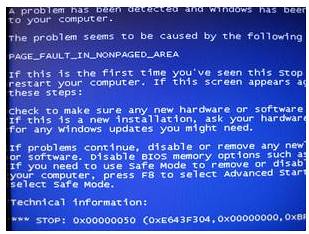
Blue screen
We may seldom meet system halted in Windows 7 while we have deep impression with system halted in XP, so we take Windows 7 not halted for granted. However, the truth is Windows 7 system also halts and it’s more difficult to solve than XP. For example, the familiar apparent desktop death in XP—you may solve it by restarting, but if you solve it in this way for Windows 7, the computer dies thoroughly which is the only result. For the blue screen problem in XP, you may easily solve it by learning from some Windows tutorials or just resetting the computer hardware, but if it suddenly becomes blue screen in Windows 7, what will you do? Most of the users can only reinstall the system and the problem may still exist. Someone said these problems had something to do with the hardware compatibility.
Absolute Change of Interface
It took me an IT worker one and a half years (from the Beta stage) to come to understand Windows 7, then what about the users who don’t understand computers so well? To change from XP that is used for 6 years to Windows 7 that is totally different from XP in style? One representative of such users is my mother who always asked me to change back to XP for her. For XP users, the change in Windows 7 is too big. Changes are not only in the operation interface and the function position but also in the function name, which are big obstacles for ordinary users. Perhaps someone will say: you can use dual system of Windows 7 and XP, but I tell you a truth: to run dual system of Windows 7 and XP on a machine with top configuration is definitely much slower than to run XP only.
Fatal Fault
Just scratch the surface
Microsoft’s customer service—a fatal fault of Microsoft. It’s an absolutely bad suggestion for you to call Microsoft’s customer service when your system doesn’t work. In XP age, they might solve some problems but in Windows 7 age, they almost become sales. Your system problems are also nightmares for them.
Summary
In my mother’s words: Change back to XP for me!
Are You Ready to Maximize Your Windows Experience?
 If you’re like most people, you want your Windows computer to go faster… to boost your productivity… to protect your privacy… and of course keep you safe both online and offline. But Windows doesn’t always make it easy to achieve those goals.
You want your computer to run like a top. And when something goes wrong you don’t want to call a geek. You want to fix it tweak it tune it or upgrade it yourself – for FREE or at least on the cheap.
If you’ve ever been frustrated by Windows problems, I recommend that you read this ebook.
Make XP Even Faster (and More Secure) by Getting Rid of Unnecessary Stuff
 Is your computer running slow? Are you getting problems with your applications? Perhaps your internet browsing has become slower?
Maybe it’s time to clean up your system!
XP Windows Cleaner is an all in one Windows system cleaning tool. It scans your computer very quickly for redundant files, temporary files, internet and application history (MRUs), cookies, cache, memory, registry and random junk. It will then give you the option to remove it. Keeping you safe and your computer clean.
About Bob:
Bob is a freelance writer and software developer for DVD Ripper.



Comparison of start up and Shutdown time is an IDIOT test of the performance of an operating system. Do you measure the speed and performance of a car by how fast you can open the door and get in it, and how fast you can open the door and get out of it? Hell no.
You care about how fast the car goes and performs once you’re in it and its up and running. And in that case, XP blows Windows 7 and 8 out the water, totally. I mean, blows them away. For memory footprint, for speed of file copies, for amount of webbrowser windows you can have open, for everything. Windows XP smokes 7.
And a true power user rarely boots or shutdowns his computer, instead putting it to sleep. I dare say Windows XP coming out of sleep is even faster than Windows 7.
When these reviews came out comparing start up and shut down time, people bought it. We were all duped. In reality, Windows 7 is just a rebranded Windows Vista that everyone hated…. slow, buggy, doggy… it is no way a fixed slimmed down Vista. After 4 years of slogging around on 7 x64 on a dual core machine, I reformated it and put XP on it and its like a whole new machine with boodles of free RAM.
The only reason that Windows XP was so user friendly was to create a market for it. This was done on purpose, there were even more things to download back then. So everyone wanted to have a computer and see movies, music, etc. Remember, that in the early days, they also tried to get everyone to buy new hardware because Windows XP wouldn’t be compatible with Windows 98 SE hardware. A lot of people sold their stuff foolishly, but more complained and Microsoft ceded to the masses and came corrected their mistake by releasing the service packs.
It was a marketing scheme to create a dependency on it. And now that we depend on it as a tool, well, they want to squeeze their hand to see how much control they have over people. It won’t work because what happens is that people will just turn their back on them and go back to using the yellow pages, buying from local stores, etc. In other words, it’s back to normal.
Yeah, i agree, the XP runs better in my Low-End Netbook, even the programs run faster than in Windows 7. And you know? Windows 7 missed one program that can help the “computer beginner” to learn, that program called “Tour”, the “Tour” in Windows 7 is HTML only and even u must connected to the internet before you take a tour about “How To Connect The Internet” 😀
Windows XP still the best OS in my heart, the word for Microsoft: WE DON’T NEED THE NEW APPEARANCE THAT SLOWING THE COMPUTER AND NEED BIGGER RAM (JUST FOR SMOOTH 3D APPEARANCE???), WE JUST NEED THE SPEED AND COMPATIBILITY
The same case here is “Mom”, my Mom, even she confused using Windows 7 and push me to downgrade when i test Windows 7 in my computer.
XP was extremely user friendly and my sp3 was very, very stable. Sadly we lost the ability to use decent browsers. I think Firfeox 14 was the last stable browser with XP and now, I see they are on about Firefox 21 – WTF!
Anyway, XP handled photos with very great ease – rename, move to different folders, the thumbnail views. Just woked well and properly. I have now been forced to use W7 for about 3 months and what a joke it is! I am the custodian of about 200000 photos and W7 is absolutely useless as handling them. Rename is a joke as it jumps all over the place and if you stop it jumping, it makes for a folder that is very, very difficult to use, W7 has great problems working with non-unicode languages in additional programs and it just makes me think that the premise for the W7 design was…make it different, doesn’t matter if it’s way less user friendly than anything we had before, tell the suckers who buy our junk they are getting something new so it must be so much better and special.
OK so I am not a gamer, I don’t own a single game even but I spend maybe 15 hours a day working on a computer. I know what works well in the real world of work computer wise/
With W7 I had to spend the first 7 days (18hours a day each) getting rid of the garbage on the context menues, making it do things like save to a folder and not a ‘library’ – who needs a library! – getting rid of the horrendous pop-up previews on the super-de-luxe task bar that block everything you need to see on the screen, stopping all the 50 or so programs I have from forever being on the start menu getting in the way when I have a lovely set of icons on my desktop to do whatever I want. W7 – backwards step….maybe 10 paces backwards. I am so pissed of with W7 that I am starting tomorrow to wipe the entire hard drive and reinstall XP SP3 and everything that goes with it. I would rather live with unsupported browsers than the utter crap that is a ‘modern’ Microscam OS. W7…..created by idiot 6 year old children with absolutely no concept of what people who use and work with computers expect of them.
Oh, you are right, I don’t twit, i don’t play games on computers, I don’t have social networks and I use a computer to make money. Remember us lot MS? we are the ones that created you and we are the ones who will shortly defect to Linux. Good riddance to MS, may the creators of W7 rot in hell and may MS become a bankrupt company that goes under.
I agree with you,
Win7 use very wasting memory and hard drive space at least you have 4 gig of RAM and require 5 times of hard drive space to run Win7 smoothly with newer processor, Windows XP can running very well with just dual core processor and 1 Gb.
The advantage of win7 was just little appearance modification but not essential.
Windows XP has better speed, functionality, compatibility with majority of software & hardware, more efficient & more stable.
Microsoft fault to built a more simple, efficient and better operating system.
Windows 7 UI is a disaster. Just to make it usable I have to turn off Aero, install 3rd-party apps Classic Start Menu and Classic Explorer. But I am not done. Then I have to figure out how in the registry to disable preview pane, remove folderband, and re-activate integral parts of the Windows UI. Even after weeks, I was still faced with ugly font rendering, Search that can’t find anything, Help & Support is broken, SP1 won’t install but the error it spits is undefined for Win7. You are locked out of your own folders unless you Take Ownership of them but when you do that it breaks junction points of the OS. They even managed to break Open With… (browse to an app, click OK, it puts you back at the Choose An App dialog and the app you chose is NOT PRESENT OR SELECTED). Other people are having these issues too and Microsoft usually addresses it by having someone with an unpronounceable name paste the same tired, monotone, incomplete instructions about how to run sfc, and if that fails, reinstall the entire bleeping OS.
Another annoyance: all the time in W7, when you switch between apps, you get ghost screen draws. In XP if you had these, it meant some app was running hidden on your system and you needed to kill the process and address the infection.
There are areas where 7 is faster or has some cool new feature, but for every step forward they’ve taken two or three steps back. Core XML Services is a broken mess. WinSXS is a laughably juvenile solution to a problem 99% of users weren’t having. UAC is the same broken “Administrator is not the highest ranking account!” strategy that was used in win2k. It was such a security disaster it had to be yanked out of beta versions of XP, but now it’s back as a zombie, ready to help your infections become immortal. The endlessly recursing Application Data folders ‘fix’ is another band-aid on a broken limb. You can almost imagine Bill Gates coding that one in 1970’s BASIC before being yelled at by his seniors and facepalming with a sheepish grin.
As long as there is hardware for which XP is a viable option, XP will remain a popular option, because Microsoft haven’t really released anything that can compete with it. If they really wanted to cement Windows as a standard, they should release XP as GPL. It would take brass balls, sure, but within weeks it would be out-performing Win 7 and 8, ensuring Windows remains the standard OS of choice, and siphoning developers away from rival platforms. Not all that different from MS’s 90’s tactic of intentionally accepting a “master key” of all 1’s for Office products. They knew making their document types into the industry standard would pay off down the road. Well, they’d better have some card up their sleeve to make money down the road, unless they want history to remember Windows as the reason why the desktop PC died.
Windows 7 had compatibility, but what that means?
That means that you have 2 or more platforms in 1 OS. So when you run applications it makes check in which platform to run. That thing consume time, resources and processing power.
Windows XP is 1 platform so it will run every thing fastest and reliable that is defined for that platform. If you want to run some “out of platform” things you have to try to tweak it, which is allowed more in XP then in 7.
Also a notable thing is that i am sure that 20%+ code in newest applications and libraries is unused, slow and not optimized for the work it have to do.
The computer I have has quite a bit on it (OpenSUSE/Ubuntu/XP/7) and I can say that XP is still the better of the 2 MS OS that are on my computer. The thing is that Microsoft wants to force everyone to follow what they have created…whether we want to or not. All of the personal opinions of us “home users” matter very little to them, like what subgenius said. They favor the corporations over us
That’s actually why I’ve been brainstorming an idea that will allow Microsoft and their “buddies” to keep 8 & its successors, while allowing people like us to keep XP. In theory it works, but I have yet to try and create a draft of any sort since programming isn’t something I know.
we should appeal to some hackers to create a patch for to make windows xp pro 32 and xpx64 compatible with all latest programs and updates that now runs only with windows 7,8.
Microsoft ruined the computer by killing windows xp now windows it’s bud and unuserfriendly like apple,with windows 7 you cannot even surf all web pages and it doesn’t have system restore like xp.
Please hackers create a special version of xp compatible with all new softeweres and games
Windows XP is the best when I had xp I had no problems playing the games I play I had to downgrade to win 7 as xp was lost after a virus went through my pc now I cannot play any game without a systome crash bloody win 7 has to update too bloody much & the updates courses the games to crash grid 2 doesn’t run very well on win 7. Win 7 won’t play GTL GTR & GTR EVO at all win 7 SUCKS BIG TIME! & win 8 is just as bad as vista I wouldn’t even poke a stick at it..
I hv been fixing computers for 7 years. windows xp, vista, 7, mac, etc. I m still prefer XP. Here is why I don’t like windows 7:
– Green Bar of Death/Slowness
opening folders is almost instant in XP, but in 7, u have to wait, wait, and wait. Can be improved by disabling Window Search
– Auto Sort in Window Explorer
unpack archive and the files are auto-sorted. also happened with renaming file…have fun searching your files. No Fix
– everything is slower….
yup, everything… you have to see loading cursor longer
– no Crash like XP? BS
Windows 7 crashed alot as well, BSOD is hidden, more hang up.
– Fixing option
boot XP CD -> install -> repair -> DONE. not available in 7
Sadly XP can’t read GPT partition….yet. I hv to force myself to use windows 7 soon and pls dont say a word about windows 8.
I also have dual HD’s in my desktop. One is XP Pro, the other is Windows 7. I think XP is far more reliable for me as a daily user, which is why I will keep things this way as long as possible. I would be better satisfied with Windows 7 if not for the oddity of going into spasms every time I bring it out of sleep [fatal errors and all]. Starts fine from a reboot but I’m not going to reboot all day. I’ve reinstalled W7 three times and researched and tried every suggestion on every forum plus the Dell and M/soft sites. Nothing helped so I gave up & called it a day. Still use W7 at times but I don’t consider it reliable. I’ve wasted about 8 months, on and off, trying to correct this. Maybe someday, IF I can ever afford it, I’ll try a Mac.
Imagine XP as 8 1/2 by 11 sheet of paper with text on it. That is your XP.
Take the above sheet and make 10 copies of it (to account for extra code required to accomplish same simple tasks), cut each sheet in 100 pieces and put all inside plastic bag, shake it well, throw at the end user and tell him to navigate – you just got yourself Windows Vista/7 (with 7 being 7% better than Vista).
Windows 8 – same as above but make 100 copies and add blender to the mix.
I have over 20 years of hard core IT/server room experience and hold MCP, MCSE. In my opinion Microsoft does something very well and that is giving away market share to overpriced Apple products.
I feel for your mother, my 60+ year old neighbor was pretty efficient with computers on XP, with Vista he just gave up, it was too much for him, it was pretty sad.
What used to take 1 click on XP is 2-3 clicks on 7 and 7-8 clicks on Win8 plus 30 minutes research on Google to find simple things. That is not being productive and bad choice for any business.
Microsoft was once good company but they lost it around 2005. Main problem – not listening to their customers. New OS are not want end users want – they are what Microsoft wants – and they want dumb proof system as they assume – you – end user is always dumb. Dumbproofing is where they failed the worst, could be because we are not so dumb.
Microsoft – people do not need 20GB of code to do few simple tasks they want to do on their computers.
XP user at work (because it works and does not think I’m a dumb ass) MacBook Air at home.
Microsoft changed the relationship between end user and PC. XP computers used to work for us. Vista and above – we have to work for computers.
That is about all I have to say, like it or not.
I believe Windows XP is the best operating system ever created. The best interface ever. When you look the inerface of Windows 7 & 8 it’ s very ugly, but in XP everything is cool and great and very beatiful OS. Microsoft needs to start thinking again and create operating system like XP interface and return Start Menu and XPs interface as well.
Regarding the applications that used in both windows, win XP can perform internal process much better than windows 7, I really tried to use some tricks on 7 which I tried on XP, and its fails, Unfortunately windows 7 is heading down to the “Trash Cycle”.
Another important point, why i cant change the start menu to classic …??? this is sucks, also for the dudes whose have a i5 or above processor, may say good by for windows XP, because it not compatible withe the processors like my laptop
shit luk.
Win XP, Win7 and Win8 all of them has Pros and Cons
its the user who will decide which of them are the Best for them
my windows 98 is slow i can keep up with that, they can keep xp and 7 lol
Yes XP is much better, and classier
But it sucks how Hardware is ditching support
Windows 8 is going to be terrible
I agree with you.Win 7 is a hoax! Windows Xp is and will always remain the best.My blessings are always there with Xp.
Scheduled Tasks in XP is a nightmare. Forget about running batch files on a schedule when a user is not logged in.
tryed all windows
windows xp , windows 7 , windows 8
windows 7 and 8 where just a waste of time
for gaming aswell the windows fucking suxxx
windows xp 64 bit all the way !
good luck playing black ops 2 on xp lol
it’s easier to re-enable wi-fi in windows xp!
I’ve used Win7-64 for 2 years and have also continued to use XP. If I need to get something done I still much prefer XP. It is faster with 4GB Ram than Win7 is with 8GB…at least with the stuff that is most important to me such as filtering large lists, running queries, and that sort of thing. I’ve timed these tasks several times and XP wins hands down.
I also like the way XP handles file copying and other file management chores better. It just feels leaner and meaner…I’ve never been one who likes bloated applications anyway and I consider Win7 to be borderline bloatware.
I agree with Bob. Windows 7 is really hard to understand. almost as hard to understand as Ubuntu. But what I would add is that it will only accept certain programs. The original volume program we used to use, not any more. Windows 7 and Vista only uses Realtek HD Sound Effect Manager. That’s the only volume program that Windows 7 and Vista let you use.
OH and about the interface change posted above (main article) he forgot to mention removed allot of functions/automated them
my 500 gb harddrive is split into 2 and with my computer they split up the two diffrent disks C and D now D is 254gb and C is 186gb due to 3% beeing saved for system restore points now i can go in and change the % beeing used i put it down to 20% but guess what that only means 10% of that drive can’t be used for squat it did not change up the size of the usuable space marely took away from the system restore a problem i might add never existed on windows xp
my external 2tb drive was using a shamshing 15% for stystem retore space (no point in it even using anything for that purpose but i put it down to 5% even so only 1.7tb could be used acodring to windows 7
plug it into my old xp desktop do the same thing Oh my available space went up to 1.9tb plug it back in to windows 7 and even there it now says 1.9tb (and no i diden’t plug it into my xp just afterwards i got annoyed after a few weeks when it was maxed out at allmost 1.7tb )
honestly if i could i’d rather even run on win 95 than windows 7 ( not that i have even been on a 95 computer in my life but odds are it woulden’t just be skinn and bones left like the win 7 OS but a lively beast with plenty of things to pick at
I used XP for years never in my life had a problem that took more then a few min to fix but on windows 7 their prime product just uninstalling trash things like bing bar makes half the computer decides to wreak havok i supose it’s just becuas they want you to use their shitty search engien
Honestly though windows 7 is made for mentally deficient kids who can’t do shit for themself they automated so many things and the automated verisions themself hardly work most of the time
My time using xp i never used internet explorer for 1 reason IT IS SO FREEKING SLOW just had to check IE 8 so launched it a sec ago had a white screen for 20sec b4 msn site poped up with my 100mb/s connection launch chrom Oh my launched and loaded as soon as i click what a suprise (and yes even if i were to clear internet temp files and cache it would still be instant on chrome and take 4ever on IE8
they allso claim windows 7 is more stable than windows xp i supose in a way that is true while xp crashed once or twice per year for me windwos 7 is more dedecated in crashing the programs i’m using several times per day oh how sweet it is to have auto save on a 30sec repete since one never know when things will crash
when computer boots it uses 1900ram just running basic functions i can then run a few things that drains enough to top my ddr out at 8gb then i turn thoose down and like magic system is only draining 1200ram to keep up all the functions that 30sec b4 took 1900 (and comp stays at 1900 is i don’t top ddr out no matter how long i w8)
I have only found 2 things that are better on 7 than xp
1. if persay graphic drivers crash they reboot whie computer is on only takes 2-5sec (not that they ever crashed on xp as far as i know)
2. the search function is a tad faster
I have Xp and 7 on my PC. I keep going back to Xp because it does everything I need with less fuss. Win 7 seems just ‘too much’ Win 7 is what Vista should have been.
No doubt I will need to move onto 7 permanently one day and XP will then feel like a slightly alien, more primitive OS, just as win 98 now does.
I hate Windows 7 and I wish I could still use xp. However windows xp would not support my ram and my vram because I have to much. I need a 64 bit windows for my computer and xp 64 has compatibility issues with some of the programs I use (I tried). So I am stuck using windows 7 64 and most of the apps are just awful compared to the xp versions. A few good examples are sound recorder which in windows 7 had 99% of the options that were in the previous versions removed and the search function that can not even find files I placed on my desktop. I was forced to replace 4 of the windows 7 program versions with there xp versions or a new app altogether (replacing windows 7 search required a new app called filesearch ex). I disabled most of the visual effects/themes because as a gamer I want those resources to be used on my game and not on making windows look nice. Now after all those changes I can tolerate windows 7 but I have no doubt that there are other windows 7 apps I will want to replace if/when I use them.
XP is the ultimate development of windows. Win 7 has taken more rights away from the user with all that extra protection rubbish which XP had hidden away but could be turned on by the user. The mistake microsoft made was to integrate NT and the ”98 line of windows. Why do we need all that IT power at home just to do word processing, use the net and play a few games?
Win 7 looks better, that all.
1st time it happened with me that i was browsing randomly and I came across my own comment I gave 3 months back. It’s kind of a different feeling 😛
I have 3 OS on my computer: WinXP, Win 7, Ubuntu. Still mostly use XP because of its functionality. Windows 7 is UI and although it looks more fancy it’s less user friendly.
Where can I get a windows xp professional ISO? 64bit 🙁 Mine crashed and well I just need to re-install the OS…I have the KEY just need the ISO to burn to a disk…
i have dell latitude e5400(old) and xp boot time is 5 seconds!!!!!1
my brother works acer aspire (totaly higher technology)windows 7 and boot time is 15 seconds
we have the same amount of space occupied because we use it for the same games as gamers
win 7 sucks. Games on w7 visualy lag, while on xp don’t. So there’s one big fat argument against w7. And also i see no difference between dx9 and dx10 or 11. Actually my dx11 card gets a lower score in 3dmark06 on w7. I’m only forced to use w7 to play dx10-11 only games like Battlefield 3 but for my everyday stuff i’m staying on xp for life.
I think that Windows Xp is Best
Ya know,
I simply do not trust M$ anymore. Every release.. ‘our’ control slips away while theirs becomes blatant. They are totally in cahoots with the DRM, RIAA and all the other alphabet corporations.
I’m betting over time, this trend will continue. More of YOUR personal options will fade, as they continue to inject their fascism on your screen.
HUG A TUX & SCREW THE GOAT!
Try running Win 3.1 on a modern machine. It goes so fast you almost can’t control it. In other words technology advances & MS software bloats to slow it down again.
LOL 🙂
In a way that is actually what’s happening, and I’ve thought about this a few times. Like, I remember my Windows XP installation on my old Celeron 1.7 GHz back in 2002 being snappier and loading faster than Windows 7 on my now quad-core 2.4 GHz processor. My overall computing experience is in fact slower despite all these huge advances in processing power, funny isn’t it? Just like you can’t out-exercise a bad diet, you can’t out-engineer crappy software!
These are some poor arguments…
No offense, but 1.5 years to adapt to the Windows 7 interface from XP’s? It’s not all that different. Only took me about a week. And I embrace all it’s improvements. Even if it did take some people some getting-used-to, it’s well worth it. “No pain, no gain” as they say! Or nothing good comes easy!
The interface is something Microsoft did RIGHT in W7 (makes me really sad about Windows 8…)!
As for any company who’s “background system” only works in IE6, this is more of a prompt for your company to update their damn system, don’t you think? If your software doesn’t work in conjunction with latest versions of all the software that it needs to, you’re lagging behind. This is like complaining that your floppy disk won’t fit into the CD drive, so you’re not going to upgrade.
I wouldn’t recommend IE to anyone, but IE8/9 are definitely much better than 6.
Hardware is the same situation as software. It’s a computer, you need to upgrade once in a while. If your hardware is not working with Windows 7, you are running some OLD hardware.
And the keyboard vs. mouse thing… Maybe it takes longer to peak at the preview panes than it does to use Windows + Tab or Alt + Tab, but those shortcuts are all still in Windows 7 and have been upgraded. The previews are actually helpful. I definitely use them, and I see others do the same. I’m pretty sure most people actually DON’T know their windows shortcuts and focus on the mouse the most anyway.
As all your mother’s arguments for XP exemplify, older generations are no good for rating new computer technology. As it is, they are less inclined to interfaces, having not grown up with them all around their lives like recent generations. And as someone mentioned in anopther comment, older people especially are resistant to changes. And that’s extreme because most people can’t handle change, regardless of age.
Might as well have your grandmother write reviews for Xbox games… “Too many damn-fangled buttons. I could never remember which finger to click with, or what button was X or R or B”
In the author’s defense, I think, given he’s an IT guy, he means “understand Win7” as in “really understand it”, like “inside out”.
if it took you a week, you clearly knew almost no power user features of xp and so aren’t one to talk
Hilarious i mean sure interface looks better but it bloows so badly i highly daubt you actualy do much more with your computer than watching your facebook page with eagle eyes and play games etc nothing advanced at all
No comment on your other remarks to lazy to find the ones you commented on 😛
I’ve worked with and grew up using XP and still prefer it by all means. For several months I have been trying to get used to Windows 7 and tested quite a few of it features. Bit-locker does not work no matter how many tweaks, the aero INTERface INTERfears with valuable resources and causes some games to crash on start-up such as Fallout 3. Even after putting 2 gigs of ram, an msi Radeon R4350, and a 500gb 7200 rpm hard-drive into a Dell Optiplex GX280 sff and its still not enough after heavy modifications to the registry.
You are better off finding compatible and newer hardware for windows 7 than running old as shit like mine. Triple boot or quad boot 7, XP (64-bit), and one or two flavors of linux. When doing so, I recommend at least 16gb total installed RAM or you will have issues. Finding decently priced mobos that hold 16 gigs of ram is not that hard. (For those who know what they are doing)
If you can’t well then, save your pennies for that wal-mart (or whatever store you go to for computers) piece of crap and XP gets tossed out on its ass when that day in 2014 rolls in.
Windows Xp is, and will always be the best
windows 7 is ok, ive used it for about two years but sad to say windows xp is better for me and as well as alot faster compared to windows 7. And windows 7 get errorrs it can get pretty bad and all tried up too.
Man, I’m glad I found this web site. I wished I found it sooner before I spent $500 on Intel board DH67BL & i7 Core 2600K Quad 3.8GHz cpu & 16GB Dual Channel Corsair 1333MHz DDR3. My hunch was right on Win 7 problems. I put Win 7 Pro 64Bit on this new board & the responds was terrible compare to my Windows XP Pro, using AMD Phenom II 3.2GHz Quad X4 955 cpu. My XP run circles around windows 7. The only reason I decided to switch over because Bill Gates is doing away with windows XP updates after 2014. He is forcing this not-so-bad stuff down our throats. Here’s the clincher, the Intel board I was using had BSOD, because my 2GB video card wasn’t compatible to Win 7. So you guess it, I’m using Windows XP Pro in my other computer & I’m a happy camper for the next 2 years. The other one is for sale
Guys Ive been using Windows XP since a really long time now on a Core 2 Duo, 2GB Ram, 500 GB Hard Disk Space. Im sorry to say Windows XP is total crap. It looked ugly, took a long time for programs to start, I had many issues with some games, It took really long for windows to start-up, I would get blue-screens, I would have software and hardware compatibility issues and I could not use newer programs or newer games which require DirectX 10 or 11, Whenever i wanted to change some features, I had to search for them on youtube and tht became a big hassle and when I wanted to find some file, I had to open the windows xp search feature and the whole thing would take about 10 mins. The only good thing about XP is that it uses less hard disk space but that wasnt an issue for me. I only recently upgraded to windows 7 and I can say that it is about 4x faster than XP. Everything opens instantly, it looks gorgeous, it can be easily customized, games worked better with it, Ive never gotten any blue-screens, no software n hardware compatibility issues whatsoever and I can run just about any program, then theres the windows search feature which allows me to just open up my start menu and search for whtever I want and thats really time-saving, I can easily change features using the “Windows Turn Features On Or Off” function and other than that I can easily change my windows for best appearance or best performance, then theres the Windows Media Center which is really awesome aswell, I can also pin programs to the taskbar which makes them easier to open. Ill admit it took me quite some time to get used to windows 7 but I did it anyway.
So the summary of everything ive said is:
Windows XP is boring,slow,ugly
Windows 7 is fast,gorgeous,addicting.
Anyone who says XP is better either has some issues with it which most people dont, or he hasnt used XP yet, or his system is too slow for windows 7 which is quite rare as my pc is slow but it runs win 7 amazingly.
Right now Im running Windows 7 Ultimate Edition 64-bit and im proud to say that its undoubtedly the best 🙂
Dude, you forgot to mention you work for MS, LOL
Hey Lova-B0i! You probably didn’t know how to properly install and use XP. Now that you got this idiot proof Windows 7 everything works relatively decent which in your case is 4 times faster then XP – only because you had no idea how to install and use XP. So I would suggest you stay out of this discussion – this is for people who have some understanding of Windows and it’s incredibly crappy OS. If it wasn’t for games – Linux can run circles around any Windows.
On 99% of hardware configurations XP works very well and on a small amount of configurations it doesn’t, it is the same with Windows 7, there will allways be a small percentage of configurations where both XP and 7 have problems functioning well, therefore I believe one cannot say one or the other is no good, however I prefer and still use XP, I recently upgraded from x86 to x64 and its just great! XP x86 functioned wonderfully on both my Core2Quad system and acer aspire 7740G. I evaluated 7 for a while but there is nothing that impresses me about it. XP does everything I need it to do and does it very well. With an upgraded visual style, IE8, MP11, added AHCI support, post SP2 update pack and loads of integrated drivers its a formidable OS. We use XP exclusively at the office as well and it does not buckle or disappoint – its solid. Our wireless ad hoc / p2p network functions flawlessly everyday as does all pc’s, laptops and the server providing internet, printing and file sharing services.
You Crack me up thank you, i laughed so badly when i read you comment 🙂
Xp was plug and play with options
win 7 plug hope it runs 0 options
The guys who bad mouth about xp are the guys using computer for gaming only. Consider any software crash, disk management, take control and understand your PC. xp is the best. If you are the guys every time PC having problems, pay money let someone fix for you. I would not blame you prefer pretty interface win7 or win8. Because the pretty interface is all you need. I am pro, I feel lost control of my PC without knowing what running on it is very disturbing. It is so sad I saw hardware companies ditch xp. If you understand your pc with xp you can do so much more than just throw in a recovery disk to solve your problem.
All wndows versions are crap compared to latest Ubuntu Linux 😉
Linux is the best 😀
Sorry for posting this is wrong thread
• I like XP because I know how to fix lots of problem in that OS, in short I mastered it.
• The greatest thing I saw in Windows 7 is snapping windows (WIN key + Arrow keys)
• Moreover, my parents, I’m worried about the graphical user interface of Win 7, like what the author mentioned earlier “what about the users who don’t understand computers so well?”.
@Darkstar (December 18, 2011 at 7:50pm) That was a good point. “what is all in the eyes of the beholder… Use what you want”
@Steve (October 25, 2010 at 2:48 pm) Wow, I don’t even know that ALT+ENTER thingy, furthermore remember the Active Desktop (Display > Costumize Desktop > Web) where you can display .gif, html, flash, etc over the background wallpaper.
I agree with him, my cousin uses windows 7 professional and it is slower than ever and it takes hours to open just one game! My windows xp professional is much more faster than his and can run game faster.
Hey! come on guys, Win7 isnt half bad either. i changed from XP to 7 and didnt really have much of a problem and got used to it in just less than a week, its faster and looks gorgeous, back when i was using XP i got lots of hardware and software issues. seven has a better response, i dont get incompatibility issues in later games, you can always use compatibility mode anyway.
I have a Lenovo G560 bloated with Windows 7 and bloatware preloaded onto it, and God it was slow as hell. Shit, even my Core 2 Duo with XP beat it in almost everything ( COMPLETELY excluding gaming performance because my Core 2 Duo uses integrated graphics. Jeez.) And I found out sometime that I can dual boot my laptop. I installed 7 and XP freaking denied to install onto it. Found out that my SATA controller had to be on compatible, with Windows XP unfortunately having poor support for SATA drives. Solved that. Bam. Windows XP is freaking faster. It is also more serious than 7.
WINDOWS XP FOREVER! 🙂
I have a Lenovo G560 with a shitty i3 processor and I was running on Windows 7. God, I so missed the old interface of Windows XP. Found out then that
I like Windows XP better then Windows 7.
My desktop with Intel 4 processor runs on XP while my Dell Inspiron 14R laptop with Intel i3 has Windows 7 and being a daily active computer user I find Windows XP better then Windows 7.
But dude I3 processor is so slow for windows 7 at least you need an i5
Jeez, people like XP better is because some people can’t afford Windows 7. To make them feel better they just talk sad about windows 7 and feel better with Xp… Sad people these days…
Hey Michi, what did you think when you were submitting all those comments under different names and email addresses, just to support your original comment? That I wouldn’t notice? Do you realize how pathetic it is to simulate people in agreement with you? (I guess when you talk about sad people, you know what you’re talking about.)
Too bad for you I have means to detect cheating attempts like yours. Of course I blocked all your other fake comments. And I published you first one only to expose your fatuity. 😈
I may not write much here these days, but this blog is still moderated.
BTW, I do own all kinds of high-end computers and devices, also with Win7 on, and I still rant that Win7 lacks XP’s snappiness.
I have 4 laptops 3 are few years old and 1 is relatively new i have win xp pro and win 7
where i have read above to some good arguments i have to admit that win 7 is okay it is good for day to day use and fairly easy to navigate and to do what is needed however i prefer XP pro i have extensively looked over both OS to squeeze performance out of machines ( i am a performance junky ) and apart from the kernel memory problems in XP i would have to say it outperforms win7 hands down
xp is faster and this is mainly because the fixes they made to solve the kernel memory problem in the new OS slows down any computer regardless of hardware when all you need to do to solve this problem in XP is close down the program you using and restart it
Why everyone needs to argue over what’s better than what I dunno. Truthfully, isn’t what your comfortable with best for you? I’ve used every version of Windows to date and my PERSONAL preference is XP 64 bit. More compatibility for hardware and programs and gives me a bit of nostalgia at the same time. I have my Windows XP x64 box running as fast or faster than a Windows Vista or Windows 7 box by far due to the tweaking program and various other things I have installed on it. Point is argue speed and all all you want, there’s ways to solve most issues. I agree Windows 7 isn’t the greatest, XP is but its after 10 years of being out there and 10 years of patching and work. Anyone remember when XP was released… the damn system was a nightmare till SP2. All systems have their problems, what it boils down to is what you like and what your comfortable with… All these damn arguments over what’s better than what is all in the eyes of the beholder… Get over it. Use what you want, if its better for you than that’s what matters… Use it and shut up!
Darkstar, you make some very good points! However I think most complaints about Win7 don’t refer to maturity or stability (if you want Vista was Win7-alpha, with all problems that go with a prematurely released software). The sad thing is, Win7 sucks by design: Its problem is not a clumsy implementation of good concepts (like it was with XP). Its problem is solid implementation of bad concepts.
I decided to purchase an SSD and switch over to Windows 7, as it’s been long enough for MS to work out whatever bugs are in 7. I went all out and got the SP1 Ultimate X64 edition of Win7.
The first thing that I noticed is that even with more RAM and the SSD it really isn’t that much faster, I don’t think most people will notice the (small if at all) speed increase. In fact, in many ways XP is actually quite a bit faster.
I believe Win7 is poorly coded.
Also compatibility problems really show up in Win7. Microsoft’s own MS Office 2007 has quite a few issues even on installation for Windows 7. I gave up on that and just used openoffice, it may be the last time I get an MS Office product.
I have a total score of 7.5 on the Windows experience index, with the sub components ranging from 7.5 to 7.8. XP performed a bit better even in 32 bit with less than half the RAM available and the main bottleneck was the HDD, 7 is optimized for SSDs and that was my main reason to get it. Now I think maybe XP would have been okay to stay with.
I’m having trouble running games like Fallout 3 and Fallout New Vegas with mods. I haven’t re-installed all my old games yet. The Wireless on Win7 seems a bit less reliable and use efficiency is lowered because it requires more clicks to fix issues with it. Skyrim does work, perhaps because it is a newer game, and the other 2 I believe were released before Win7, or before it became widely adopted (if it even is now). This is not a problem XP had, as most older programs and games did, and still do, work on XP.
Win7 is solid for people that are using a pre-built system or don’t have much experience with computers. However if you build your own systems and did your own WinXP troubleshooting, Win7 will probably bring more problems for you rather than a real increase in performance.
Windous xp is indeed more sensitive to bugs and instability (sometimes even running apps malfunctions can cause a crash) and windows xp GUI was not as transparent and cooool looking as the winodws 7 aero s**t ( it is s**t because it useless i use the normal grey rectangular taskbar on windows 7 because it is to flashy comapred to the more serious XP luna)
HOWEVER!!!!
NO ONE ON EARTH can prove that windows 7 is easier to customize( besides the aero themes with changed background i found no actualy different looking themes) or easier to adjust in any way!
i had to go in 5 diferent places of control panel and delet all my toolbars gust to get it down to the normal xp taskbar size ….. u cant say widows 7 has a thin taskbar … windows 7 taskbar is the fat ass girl of all os taskbars (i had xp,nt,linuxes- ubuntu-fedora-limpus…)
windows 7 was made for god dammed office rats … no easter eggs , hard to temper with the important setting ( i had windows 7 for like 5 mounths and i still haven’t managed to get to the dam regidtry and administrative tools X( annoyng) i cant change anything as easy as i did in xp …. in xp everthing was 100% intuitive …… if u had an iq over 15 u could easly install and optimize xp …. and so on…..
if they kept the GUI and the CP (control pannel) of xp and put it on the great sistem of windows 7 including the aero thing ( btw … if u have xp u can install the aero theme and run programs that were intended for win 7 or vista – i think vista is a pice of S**T a friend of mine has it and says it crappier than hand calculator)
All you lot are wrong. Windows xp is slow, boring, and a total waste of time. The interface is crap and it catches bugs easy. Windows is fast, easy and amazing when it comes to games. It has a great inteface with fast shortcuts. And whoever likes vistor really really should get a new sort of mind. Windows 7 is the only original success in my personal opinion. xp+vista= bin!
hmmm … windows XP .. the legendary windows ever made in the history of mankind ..
well if u want a better look then search in google for windows 7 themes .. lol …. 7 is SLOW by all means ,,
may i remind u guys that XP has an incredible PLUG AND PLAY support which 7 DOES NOT have ?
hey try to use a webcam for ur desktop is 7 … u never get to click any pic from it ..
but in xp u can do it real easy ..
but the media center is an awesome gift of 7
but XP is the best for its blazing speed and yeah it will remain best forever
well, if slower mean better then, yeah xp is better.
and why complain about feature? you don’t know that you can turn it off or even uninstall it?
oh! i forgot, many still stick with xp!
7 is unstable? now i am sure those said that, have never use 7.
I am using it, and some of my apps start much slower on a machine that has like 5x the power of my old XP machine.
you right I’m totaly agree with you and your mom.
Windows NT4=Good fast
Windows XP was heavier for me than windows ME/95/2000
Windows Vista=totaly shit
Windows 7= Still heavier than XP but less crap than Vista
If you buy new 64 bit pc format it and instal windows xp 64 bit, it’s much better than Windows 7 64 bit
I AM USING BOTH XP AS WELL AS WINDOW7 BUT I LIKE ONLY XP. WE CAN PLAY GAME EASIER IN WINDOW 7.
😆
If I wanted my OS to change that much at one time I would have just bought a Mac, and in fact I think that’s what I’m going to do. Thanks Micrsoft for being so freaking stupid.
windows xp & windows 7 are different on different backgrounds. but some features which were really exceptionable on xp are still mising on windows 7…There are many softwares in the market which are still not compatible with windows 7…………
so in my point of view i’ll prefer windowsxp rather than windows7
I’m sticking to xp as i use some programs that are old that i used on win95 and 98 and there’s no updated programs so they work on XP plus there are things that i can do on XP that i can’t do on 7 i wont be upgrading “if it isn’t broke don’t mend it”
I find win7(in my case prox64)much more reliable than XP. Took me some time to adjust it, fix some really annoying things (visuals, not responding problems while rendering etc.) but at least I don’t have to reinstall OS every 5-6 months. I did some nice job in XP over the past few years, still have it on old PC at home. Before I switched to win7 I used XP x64 edition for audio production in studio, found it very stable and fast, no hardware or software compatibility problems… Now I am very happy with win7 on both my desktop in studio and laptop that I use at work. I don’t play games so no comment on that….
As reply to Te Dude: you can easily customize taskbar the way you want in taskbar properties
Mr ‘DK films’ wat do you mean by this 21st century interface?? An interface is meant to be the one thru which we must be able to access all the resources of any device, no matter how qualified you are or not. XP is one of the best example for the above statement.And i am a PC Technician. for me, wen i am going to diagnose any PC or any network issues.. windows 7 can only waste my time because of the fading effect which takes abt 1 sec to popup a window and wastes my clients time.. i think the great engineers worked behind XP is no longer the employs of Microsoft. Because they know wat a user needs other than anything els.
its up to the individual user mate windows 7 might be okay for some but not for others i myself am staying with XP but that doesn’t mean other people should do the same
Dear people,
I just “upgraded” (!?) my PC
FROM : intel dual core 2.33ghz ASUS PK5 SE – 2GB RAM – Win XP SP3
TO Intel core i5 – ASUS P8H67-M LE – 8Gb RAM – Win 7 –
apart from the Win 7 nightmare – hassles – heaviness – useless graphic interface shit to make it work is a tragedy !!! I need a fk computer to work with – not to struggle with its os !
my OLD PC goes 3 time faster !!!
i absolutely totaly agree with you!
maby windows 8 will pack the “game eingen” of windows 7 with all the previous interfaces (rectangular grey thing i can’t name ; XP luna (i luv it); aero (eating graphic resources just to be the fattest taskbar ever if u leave it default) and soomething new probably) and of course the well made Control pannel and administrative tools of windows xp ( cuz they rule and they are maby not as user friendly(/female friendly) lookign as the windows 7 but they are intuitive and fast)
Hey guys, I think windows xp is far better then 7. My pc used 2 run with windows 7 ultimate, it used 2 many ram on my pc then xp, xp uses a little, my games is running much faster after I installed xp professional. So I would rather consider using xp then 7. Far more convenient then any other OS, 2 go from windows 7 ultimate to windows xp was almost like an upgrade
lol at a guy who doesn’t understand style. windows seven IS windows XP with a 21st century interface. don’t be a hater because of it. Oh wait, someone’s mom says XP is easier? Yeah right.
“Honey, I can’t find the execution file for word?”
“Oh, that’s okay, with windows 7 all you have to do is search it. then click on it”
“Oh, okay, that was easy.”
mmmm. weird. also, its 2011, all the compatibility issues are GONE! geez, grow a set and learn the new technology.
Hmm, style? Is “style” going to make up for the 8 minutes it recently took Win7 to move (move! not copy!) one folder? For the blatant inefficiency of how their “style” and “security” and whatever buzzwords MS is coming up with to fool people into buying it are implemented?
Issues gone? Gone my a**! Win 7 is something that belongs in the labs, not on the shelves. I can live with no-cost, open source programs being released prematurely, because that’s the only life cycle they can have. But overpriced proprietary stuff should be damn well tested before they start selling it!
I agree with Hackadelic, Windows 7 is garbage an should be replaced.
I’ll have to agree with you. The only reason why I use Windows 7 is because everything is centered around it at the moment – games, device drivers, software…
In absolute terms, it’s a fairly poor OS. Mainly the GUI. Cannot customize to one’s preferences. ClearType for example – it is supposed to improve text readability on LCD’s (that sound backward to anyone yet? Aren’t LCD’s supposed to have better text readability?) But what if I don’t want to use it? IMO, it makes text blurry and hard to read. Yet you cannot disable it. Using the ClearType text tuner will turn it off for a few places in the OS, but in the others, no, why? Because it is hardcoded into the Aero theme. Whose idea was this, again? Naturally within an hour or two I find myself craving the nice standard antialiasing of XP’s Tahoma. Thick, unnecessary padding and borders, pointless window elements like the Folder Band in explorer…makes my 24″ monitor feel like a 19″. And the Start Menu? Dear god, I cringed when I saw that. It takes almost 15% of the screen by itself. Thankfully you can fix it with Classic Shell. And even if you somehow strip away the wreck that is the UI, you’re left with a slow, bloated OS that runs dozens of services – half of which are unnecessary, installs completely pointless features, such as the Windows Mobility Center. Try running that, it will tell you it is available only on Laptops. So, why the hell is it installed on my –Desktop– PC? It would have been a good idea if you could select which elements of Windows to install during installation… oh wait, that idea was implemented in Win98 SE. Another feature that Microsoft improved (removed). I could go on and on, but I’m forced to use it and hate every second of it. Just look at what they’re planning with Windows 8 – the basic Windows 7 interface is unchanged, and a useless tablet/iPad GUI is tacked on? Fu** it MS, I’m done with you and your incompetence. Time to find a good Linux distro.
Windows 7 is bloated.
I bought a new laptop today able to run Win7 or XP (both included)
Which one I’ll use?
XP!
🙂
farewell
Toshiba Tecra S11 PTSE3C-010013
Excellent choice 😉
Windows 7 : Bad pictures preview on folders :
For me, one of the most annoying problems in Vista / Windows 7 is the representation of pictures previews on folders. XP puts 4 previews of pictures from folder, whole pictures are visible, so you can easily figure out what is inside a folder. In Vista / Windows 7 content of a folder is represented as a pile of pictures, one over another… pure nonsense ! Maybe someone considered such 3D view more realistic, but it is way less useful, and I haven’t find a way to bring back the preview from XP – Maybe someone have a solution for this ?
Windows 7: Explorer window with annoying section on left side, but without the easy to use button to go to parent folder. I like to have a simple, compact & clean view of folders, in Windows 7 & Vista it seems impossible 🙁
Just install XP, bro…
I would have to say yes, I still think XP is better than Win 7. Unfortunately, I had to upgrade from XP to Win 7 Enterprise at work. I really don’t see what the big fuss is over Win 7. They basically move everything around, renamed some of the features and add the annoying UAC. I miss XP already.
It seems that all of you agree that xp takes big time. i disagree big time.
the only reasons for using xp imo are these:
1. it cost money to upgrade
2. you have an old computer
I think win 7 is better because of these reasons among other
1. problem fixing – at first i was skeptical about clicking “troubleshoot” when right clicking stuff, because I thought i will end up getting a message telling me there is an unknown problem, but as i used it so many times, i think its working amazingly and I think it will only get better and better as more problems will be added to the database
2. intuitive links – there were intuitive links in xp as well on the right side of windows but in win7 the links are well organized and always are what I’m looking for
3. libraries, pins, tasks links – genius inventions, make life so much easy
4. better search – well, not quite the best search in the world of OS but much better than XP when you just type a letter or two and get results that consists from files, apps, emails and more
5. in my eyes, win7 looks nicer and cleaner and I can edit the desktop themes
6. win7 has a better support in cores and ram, and it connects easier to TV
I’m sure my mother will use XP until 2030 at least but not because it’s easier, just that because that’s what old ppl do
Once upon a time, there was an automobile company named Mazda. They had one of the best engineered, fastest, quietest, reliable sports cars in the world – it was called the RX7. But they got bored with the wankel engine, and of course, congress didn’t like it because they couldn’t understand it. So they pitched the best system in the world in favor of a swankier, more engineered car. It did more things rather than doing the things it did, well. Eventually, even the most dedicated Mazda RX7 fanboys gave up and moved on to different brands. The moral of the story is: DON’T OVER-ENGINEER YOUR PRODUCT! That’s exactly what Microsoft has done. It’s not that the new system isn’t OK, it’s that it’s not as good as its old system. Simple as that. Name a function. XP is better. Example – move an icon to a place on the desktop – it moves back at its earliest convenience. It does keep order if you’re an anal retentive, but it won’t let you be creative as XP does. Dilbert was right about Microsoft, Inc.
“However, they would much rather take the interface backwards and dumb down the user base while appealing to the MPAA/RIAA that their system is the most DRM friendly.
(Some here may not know that Windows 7 (And Vista) DRM Enforcement is a chain of trust going all the way up from the bare metal to the Display/Sound Drivers)”
Vista/7 was a coup d’etat for Content Producers – just like Sony’s Blu-Ray format was.
Format openness and consumer choice will suffer as a result of this.
It will take a few years for these coup d’etats to realize themselves but corporate control over content will certainly re-establish itself.
Then you have Apple which are DRM lock-down fanatics too.
You know, i have just started to use windows 7, and it is defenetley slower than windows xp. My laptop is a dell vostro 1500 with an intel centrino and 2 gb ram with 500 gb hdd, and xp runs much better. But i haven’t passed by the posiitive thing it brings. It is true that it is in a way a little more hard and tedious to use, but it`s maybe because i`ve been using xp sor more that i can remember, but it is in a way easier to build networks in it, unfortunateley i use them for gaming, and games do not run smoother on 7. Also i have noticed that i can not haver the windows media player runing while y play a simple game, like starcraft, because it laggs my game, in xp this did not happen. On the bright side, i do have less problems than i did with xp. Less blue screens, it almost does not freeze, i do have a better netwok experience, it shuts down faster, although it does take more to start up, but you can speed it up with some programs, like tune up. The sad thing is that all new programs and games are comming out only for win 7, as well a new external and internal hardware. I do like better xp, but 7 does makes a lot of thing easier, for the cost of performance though.
I actually had the same problem while playing media player and sim city 4 DE, I found a fix for it on the internet… I can’t remember what it was though, had something to do with the sound management however… good luck… Oh and I just bought Win XP Pro x64 for my new computer ^^, I didn’t like windows 7 when I was on. I had it for a year, so not like I’m a noob.
Now I understand your problem guys. Windows 7 would definitely run slower on older computers but if you buy a new computer with windows 7 pre-installed, you can say that 7 is much better and faster than xp or vista.
That’s pure bullshit. Windows XP runs way faster on any system and it doesn’t matter if its old or new…
That is sooo not true, i installed a new amd motherboard and 8gb ram with nvidia geforce gtx 590 graphiccs and i put in windows 7 it ran slow as hell, if i chose i would be going with xp
It is your hard drive then LOL
Windows seven is FASTER on systems that don’t have crappy 5,200 RPM hard drives.
What a BS! Every OS runs faster on higher RPM hard drives than it does on low RPM ones, and WinXP wins hands down on all.
This “knowall-888889990” is typical dummy user. From his comment below show he even do not know why computer run faster. Please take your comment out “knowall-888889990” you make us laugh.
“It is your hard drive then LOL
Windows seven is FASTER on systems that don’t have crappy 5,200 RPM hard drives.”
the words in this article are really true ,window xp sucks but window 7 f*. [REM Word censored by moderator to not upset Google. Hint: It rhymes with “sucks”.] 😉.
i also agree
xp is better than 7
thre are some reasons for that like:
less space needed
very simple and practical
7 is a little bit more complicated
no system restore points IN WINDOWS 7
windows 7:If damaged it will have to be reinstalled
ya i agree that xp is most better than glitch vista or seven, cos once i installed seven in my machine, and after a week , i got a virus and all programs started screwing and system become slow, antivirus even couldn’t sort it out (avast pro) so i tried for system restore, but there is no point stored automatically in win7 as when compared to xp which stores every programs uninstall point or even install in restore points then i came to know 7 only does store some restore points after a week or so. so i jacked off and then reinstalled xp and i am running fine, i love xp and will stick to it then unreliable 7
Hackadelic, I want to personally thank you for an insightful article which helps to put this whole sorry mess called “Windows 7” into perspective.
I had upgraded to Windows 7 on my home laptop (Aside from Linux, which I much prefer) but always felt that something just wasn’t at all right.
Your piece highlights succinctly and clarifies where this feeling comes from, and why the system is just so painful to use at times.
I shall be getting Windows XP SP2 64 Bit edition reinstalled on my machine along with the requisite security software (Including Avira and a snort based IDS) as soon as I can.
And also, I think µ$oft are perfectly capable of producing streamlined software. XP, while not perfect, was the closest they ever came.
However, they would much rather take the interface backwards and dumb down the user base while appealing to the MPAA/RIAA that their system is the most DRM friendly.
(Some here may not know that Windows 7 (And Vista) DRM Enforcement is a chain of trust going all the way up from the bare metal to the Display/Sound Drivers)
Thanks again,
Aimee.
Windows XP 64 bit runs 30054248544844548921454 times faster on my core i7 extreme with 6GB of RAM than Windows 7. Since Direct X 9.0 is still the gaming development standard, Windows XP is a far superior gaming operating system. Win 7 is good and vista sucks. However, XP is best
Recycling the “Why Win 98 is Still Better than XP” Article, eh?
Ron, what do you mean “recycling”?
This was a guest post, and I took it in good belief. If it’s a ripoff of another article, I’d like to know.
An exact search for “Why Win 98 is Still Better than XP” did not yield any results though. Would you like to clarify?
love that comment ha ha
I also agree on this, on my laptop games run a lot better on XP than 7 in fact win 7 blocks about 25% of the video card.
Bill Gates has proven again that his favorite meal is Spaghetti. Go figure.
What your mother prefers shouldn’t be included in your own judgement of which is better, windows 7 or XP? After-all, parents tend to be conservative and resist change. To the best of my belief, windows 7 is very compact and comes with a lot of functions that have been simplified to ease operation. I don’t understand what people mean by “windows XP is more stable”. Stable in what? The simplicity and unchallenged advancement that windows 7 brings to its users puts windows XP to a lower level compared to the former. Copying files, burning files with windows 7’s own resource, sorting out saved documents, the functionality of browsers, etc. make windows 7 the best.
Kwains, I’m not the author of the article, but my experience with Win7 provides for a different picture than yours: Win7 is neither compact, nor simpler, nor – and this is what pisses me off most – faster than WinXP. And by that I mean that the same application starts much slower on a brand-new Win7 PC with a ton more of memory, disk space, and CPU power than on a 3 year old WinXP machine with a fraction (like about 25%-50%) of all that. Applications also run faster on that old machine, though the start up latency is the most annoying thing, it’s really freaking me out actually! None of the alleged “new functionality” of Win7 (what new functionality?) is really that much of a benefit to compensate for the poor performance. (Though I’ll admit Win7 performs slightly better than Vista, but that’s not a hell of an achievement really.)
I have quite a clear picture why µ$oft is literally unable to create a streamlined, snappy piece of software, but that’s another story, and is to be told another time. 😉
I remember when I was a diehard Windows 2000 fan while all the “followers” were tearing their hair out over Windows Me, the junkiest Os that Microsoft ever built. Sure 2000 was plain and lacked coming preloaded with everything. But it was stable. XP was a pile of dung until SP2, and even SP3 made XP fall apart again. Its easy to see how much trouble it is for Microsoft to do anything right. I am thinking it is purely an accident when they get something right.
When I switched to XP 64-bit, I was amazed at how much faster it is and it has served me well no matter what I throw at it. But keep in mind, no Os is perfect. Part of what makes one run reliably is the person who uses it. If you are advanced at troubleshooting, you have no problems squeezing the most out of it. But somebody’s uneducated mother would have viruses every week.
I made the switch to WIndows 7 Ultimate a month ago and have used it everyday, installing many programs and putting it to the test. First of all I must say that the security is a major annoyance. But it can be turned off. It has worked very well. But three days ago I decided to restore my backup of XP 64 to see what I was missing. Talk about FAST!! I had almost forgotten how much faster XP is. WIndows 7 hesitates when processing which tells me it isn’t very efficient at all. Sure it avoids the crashes 99% of the time. But at the expense of true performance. It eats up RAM like an addiction that never quits. That’s crazy. XP never did that. Some people tend to justify Windows 7 by stating that its easy to just buy more RAM. I have a different outlook. Any Os that can run the way XP does with little RAM is built well enough. Windows 7 is bloated. Firefox browser was once the greatest browser until it became so bloated that it couldn’t run efficiently. WIndows 7 falls into that category. But I notice that recently Firefox has gotten back on the right path again and runs very well. Heed the words Microsoft!! WIndows 7 is nothing but the reality of what your WIndows Me dream once was. But XP is still the true king.
Windows 7 is EXTREMELY unstable compared to XP. I doubt businesses will swap to it without a few service packs.
I entered XP before SP1 and was told to go with 98SE but I wanted a new OS with a new computer. Whatever service pack you went to in XP wait for the equivalent in W7. (I’m looking forward to W7 SP3 – but not holding my breath)
Things that go wrong with W7: lots of programmes with (not responding) including Office, which requires using the task manager regularly to fix. eg. Excel opens very slowly or loses information even after saving. That is pretty scary to get used to losing hours of work with no control over it. An odd one was having to run a CMD scan when you loose the PASTE function. There are problems with connecting to company servers.
There are a lot of nice things with W7 that stops me going back to XP, but if you are using XP wait for some service packs for W7 to come out to fix a very unstable OS.
The best way to define W7 is to say it is very nice looking crap
“The best way to define W7 is to say it is very nice looking crap”
Totally agree with you. People who complain XP boring slower etc. they are dummy users. They know nothing about they pc, pretty picture is all they need. As a pro. I prefer XP, I know every registry on my computer. When it has problem, I fix it and do not need recovery disk to wipe out disk. I have totally control of my pc with xp.
Here’s my Windows 7 hate list:
Remember good old ALT-ENTER for a quick free space check? GONE
Remember good old free space at bottom left of Windows Explorer? GONE
Remember a user responsive desktop as 1st priority? GONE
Remember a less RAM consuming bloated OS? GONE
And to think the future is mobile computing and Microsoft insist otherwise.
Apple has literally been handed the future with iOS leading the way.
Ubuntu!
I agree 100%, Windows 7 adds more hasle to use, microsoft calles it fetures. i ‘m forced to use windows 7 at work and i hate every minute of it. i’m looking for a shell exchanger that will make windows 7 works like windows xp. there is one but it only fixes the start menu not the taskbar. what i hate the most, it groups tasks togther, no i want them in the order i open them becouse they are related by the task im working on. i wish someone sue microsoft for monabily becouse they are shoving this OS down our throught becouse they rae stopping support for it.